Last updated: May 29 2026
This guide is built from real questions and experiences shared by EAs in the Empower & Elevate community. Have something to add? Send it to Kim and we'll get it in here.
Purchasing & Access
Clients have asked whether they can purchase EOS Leadership Manuals directly through EOS Academy or if all purchases must go through their Implementer.
EOS is not currently selling the EOS Life Journal through the Academy or EOS Worldwide directly.
Getting Started
Placeholder - replace with real question and answer when available.
Using the Platform
EOS has migrated the resource library from Dropbox to Google Drive, making it easier to find and download everything in one place. Files are still available as hyperlinks throughout the Academy, but you can now browse and download the entire collection directly.
The Main Hub: Look for the "Implementer Academy Files" space inside the Practice Management space group.
The Quick Link: Click the "File Library" link in the menu at the very top of the Academy page.
Note: Master files are view-only. To customize a template, download it to your device and edit your personal copy.
Ninety
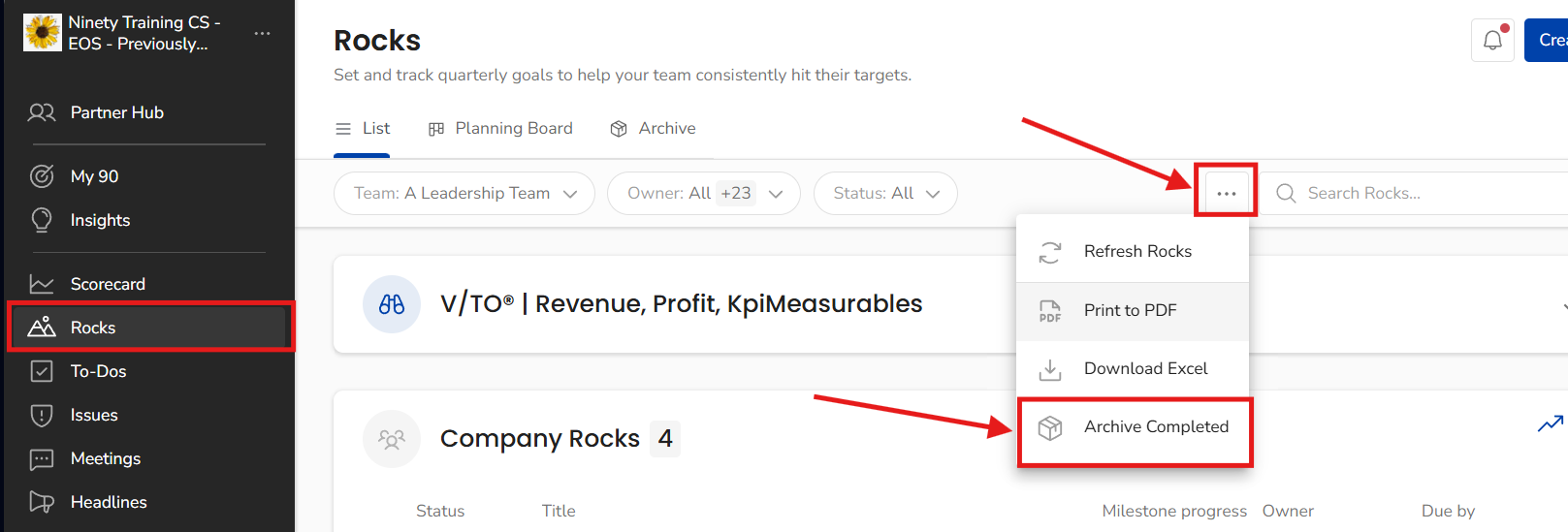
Once your Quarterly is complete and you're ready to archive the completed Rocks for that quarter, here's how to do it in Ninety.
2. Click the ellipses (...) button at the top right of the filter bar.
3. Select Archive Completed from the dropdown menu.
Known Issues
Placeholder - replace with real issue description and workaround when available.
Have something to add?
This guide grows with the community. If you have a question, a tip worth sharing, or a bug worth documenting, send it to Kim and we'll get it added.